This block was used for synchronizing the measurement of the quarter-hour. The input quarter-hour pulses are captured by the Wago 750-404 counter card, and the goal is to detect a change in the state of the counter (an increase of one pulse or potentially a counter overflow) and generate a pulse of one cycle length that would reset the counter for seconds in the quarter-hour. Directly feeding the synchronization pulse from the binary input into the counter input BD30 (as shown in the diagram below) would be risky— the pulse could be too short to safely pass through the input cards and the bus into the application program.
Here, the IF...ELSE...END_IF condition is already used, and using structured text makes sense. The source code is just a few lines—when the difference between the input and the stored value occurs, the internal variable pom is updated, and a logical 1 is written to the output for one cycle (until the next comparison).
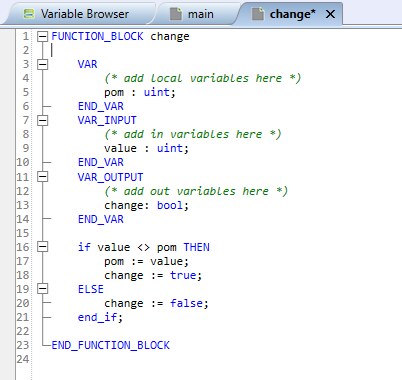
The implementation of the change block in the program shows that even such a simple function significantly improves code readability:

The most significant challenge when working with elementary functions, variables, conditions (IF...ELSE, CASE), and loops (FOR, WHILE, and REPEAT) is probably getting the correct syntax.
One of the most unusual tasks in technical support was to algorithmically calculate the week number according to ISO 8601. The complete listing of the source code for the function block is as follows:
FUNCTION_BLOCK iso_week2
// As in https://webspace.science.uu.nl/~gent0113/calendar/isocalendar_text_5.htm
VAR
today : dt;
wday, weekday, isoweeknr: dint;
m, dd, dow : sint;
day, month, y : int;
isoyear, year, d, d0, weekday0 : dint;
END_VAR
VAR_OUTPUT
iso_week2 : int;
END_VAR
today := getlocaltime();
DECOMPOSEDATE(T := today, YEAR => y, MONTH => m, DAY => dd, DAYOFWEEK => dow);
year:=to_dint(y);
month := m - 1; // 0=January, 1=February, etc.
day:=dd;
wday:=dow;
weekday := ((wday + 6) / 7) + 1; // weekdays will be numbered 1 to 7
isoyear:=year;
d0 := gregdaynumber(year,1,0);
weekday0 := to_dint(((d0+4) / 7)+1);
d := gregdaynumber(year, month + 1, day);
isoweeknr := trunc_sint((d - d0 + weekday0 + 6) / 7) - trunc_sint((weekday0 + 3) / 7);
// check whether the last few days of December belong to the next year's ISO week
if ((month = 11) and ((day - weekday) > 27)) then
isoweeknr:=1;
isoyear:=isoyear+1;
end_if;
// check whether the first few days of January belong to the previous year's ISO week
if ((month = 0) and ((weekday - day) > 3)) then
d0 := gregdaynumber(year-1, 1, 0);
weekday0 := ((d0+4) / 7) + 1;
isoweeknr := trunc_int((d - d0 + weekday0 + 6) / 7) - trunc_int((weekday0 + 3) / 7);
isoyear := isoyear -1;
END_IF;
iso_week2 := to_int(isoweeknr);
END_FUNCTION_BLOCK
FUNCTION gregdaynumber: dint
// computes the day number since 0 January 0 CE (Gregorian)
VAR_INPUT
year : dint;
month, day : int;
END_VAR
VAR
y: dint;
m, d: int;
END_VAR
y := year;
m := month;
IF month < 3 THEN
y := y - 1;
m := m + 12;
END_IF;
gregdaynumber := trunc_dint(365.25 * y) - trunc_dint(y/100) + trunc_dint(y/400) + trunc_dint(30.6*(m+1)) + day -62;
END_FUNCTION
It is a function that is not often used, but it can be useful in cases involving time programs, exceptions, controlling devices in shift-based operations, etc.
It also shows that the code of a function block (iso_week2) can include other definitions – for example, the gregdaynumber function, which is then called three times in the block code (and thus it makes sense to separate this calculation as a function). The function definition comes after its call, which does not matter. It is enclosed by the words FUNCTION … END_FUNCTION.
And third – the function DECOMPOSEDATE is called in it in ST, which – like all functions, as we’ve already mentioned in the description of the differences between functions and function blocks – has only one implicit output but can provide data for multiple variables. We will show various ways in which functions exchange data with the environment. The call happens right on the second line of the code, after declaring the variables and loading the current time into the variable today.

The implicit output of the function “=>” according to the help returns a value of 1 if the conversion was successful. However, this information is not of interest to us in the program; we need the function to write the current values of the year, month, day, and day of the week into the corresponding block variables. This is done by assignment using the operator “=>”. In contrast, the input variable today is connected to the input of the function T via the assignment “:=”.
DECOMPOSEDATE(T := today, YEAR => y, MONTH => m, DAY => dd, DAYOFWEEK => dow);
These operators are essential for working with functions and function blocks called in ST. This "connection" of the function to variables is called parameter passing using a formal parameter list. The order of the parameters does not matter here; unmentioned inputs have implicit values.
Another way to assign inputs and outputs for the function is to directly write the variable names as arguments using an informal parameter list:
DECOMPOSEDATE(today, y, m, dd, dow);
In this case, however, all positions must be used in the order as listed in the help. For example, if we did not need the year value, the call
DECOMPOSEDATE(today, m, dd, dow); // ERROR
would result in a compilation error – here, type incompatibility: m is SINT, but INT is expected for YEAR. Even if the types matched, the call would have too few arguments; one input and four outputs are expected. The correct call with a limited number of arguments is done using the operator:
DECOMPOSEDATE(T := today, MONTH => m, DAY => dd, DAYOFWEEK => dow);
Mixed calls, such as:
DECOMPOSEDATE(T := today, y, m, DAY => dd, DAYOFWEEK => dow); // ERROR
are not permitted.
As another example, let's consider sending an alarm email:
The following structure shows not a function block, but an entire program. Every program starts with the keyword PROGRAM and may again contain variable declarations at the beginning.
The variable SendLast monitors to ensure that the function messaging.sendmail is not called with every program execution (for example, every 20 ms), but only when the value of the Send variable changes from False to True. The result of the operation is stored in the Result variable, where a value of 0 indicates that the sending was successful. (The most common mistake here is getting result 16 = unknown email channel, which means that either the alarm channel is not defined in the PLC’s alarm definition, or a wrong name is used in the function call – note that the name is case-sensitive, so alrchannel and ALRCHANNEL are two different names.)
PROGRAM alarm_email
VAR
Send : bool := False; //náběžná hrana odešle e-mail
SendLast : bool;
Channel : string := 'alrchannel';
MailFrom : string := 'sender@domain.com';
MailTo : string := 'recipient@domain.com';
Subject : string := 'Alarm!';
Message : string := 'There is an alarm in the PLC.';
Result: SINT;
END_VAR
IF Send AND (NOT SendLast) THEN
Result := messaging.sendmail(channel, MailFrom, MailTo, Subject, Message);
END_IF;
SendLast := Send;
END_PROGRAM
That's all for calling functions with arguments.
